
ASPX page execution order

Page_PreInit()
Page_Init()
Page_InitComplete()
Page_PreLoad()
Page_Load()
Page_LoadComplete()
Page_Prerender()
Page_Render()
Page_Unload()
Monday, December 7, 2009
ASP.NET Concepts & theory

Friday, December 4, 2009
Partial Methods in C#
This is a cool feature that comes with C#.
We can define a method & can omit the logic of that method, that is called Partial method.
If the implementation is not supplied, then the method and all calls to the method are removed at compile time.
This is useful as a way to customize generated code & the developer can work of same method without run-time problems. Because it is separated. We can validate data before it executes using these types of partial methods.
* Partial method should inside Partial Class
// Code-generating tool defines a partial class, including // two partial methods.
partial class ExampleClass
{
partial void onFindingMaxOutput();
partial void onFindingMinOutput();
}
// Developer implements one of the partial methods.
// Compiler discards the signature of the other method.
partial class ExampleClass
{
partial void onFindingMaxOutput()
{
Console.WriteLine("Maximum has been found.");
}
}
We can define a method & can omit the logic of that method, that is called Partial method.
If the implementation is not supplied, then the method and all calls to the method are removed at compile time.
This is useful as a way to customize generated code & the developer can work of same method without run-time problems. Because it is separated. We can validate data before it executes using these types of partial methods.
* Partial method should inside Partial Class
-
Partial method declarations must begin with the contextual keyword partial and the method must return void.
-
Partial methods can have ref but not out parameters.
-
Partial methods are implicitly private , and therefore they cannot be virtual.
// Code-generating tool defines a partial class, including // two partial methods.
partial class ExampleClass
{
partial void onFindingMaxOutput();
partial void onFindingMinOutput();
}
// Developer implements one of the partial methods.
// Compiler discards the signature of the other method.
partial class ExampleClass
{
partial void onFindingMaxOutput()
{
Console.WriteLine("Maximum has been found.");
}
}
Friday, November 20, 2009
Mockups Vs. Proof-of-Concept Prototypes
There are many types of prototypes. Some projects create UI prototypes. Others might proto-
type an architecture consideration. In fact, every project has different needs regarding a prototype.
However, for your purposes, these prototypes can be classified into two principal groups:
mockups and proof of concept.
A mockup is meant to verify the requirements and use cases through the creation of a number
of key screens in the system. Also called horizontal prototypes because they take
a single, horizontal picture of the application. They do not go deeply (or vertically) into the
other layers of the application such as the business objects and the database layers. Mockups
are a great way to determine whether the requirements are complete and understood. They
also help validate the use cases, the navigational structure, and some of the logical interactions
of the application.
Mockups do have shortcomings. They do not help you prove any of the architecture concepts
for the system. They also do not validate the technology decisions. Mockups are
great tool for moving from paper to something more tangible.
A proof-of-concept prototype(POC) is meant to validate the requirements and confirm the technology recommendations and high-level design. A POC is also called a vertical
prototype because it looks at the application across the entire stack (UI, services, business objects, and database). POC prototypes have also been called reference architectures,
because they provide a reference for the development team on just how the system
should work from top to bottom. This removes ambiguity, creates a standard, and eliminates
a lot of risk.
We create a POC prototype by choosing a key requirement of the application and
then building it out through each layer of the design. It makes more sense to prove out a riskier
requirement than to work with a well-known requirement. The latter might be easy, but it lacks
the risk reduction you are looking for with a proof of concept.
type an architecture consideration. In fact, every project has different needs regarding a prototype.
However, for your purposes, these prototypes can be classified into two principal groups:
mockups and proof of concept.
A mockup is meant to verify the requirements and use cases through the creation of a number
of key screens in the system. Also called horizontal prototypes because they take
a single, horizontal picture of the application. They do not go deeply (or vertically) into the
other layers of the application such as the business objects and the database layers. Mockups
are a great way to determine whether the requirements are complete and understood. They
also help validate the use cases, the navigational structure, and some of the logical interactions
of the application.
Mockups do have shortcomings. They do not help you prove any of the architecture concepts
for the system. They also do not validate the technology decisions. Mockups are
great tool for moving from paper to something more tangible.
A proof-of-concept prototype(POC) is meant to validate the requirements and confirm the technology recommendations and high-level design. A POC is also called a vertical
prototype because it looks at the application across the entire stack (UI, services, business objects, and database). POC prototypes have also been called reference architectures,
because they provide a reference for the development team on just how the system
should work from top to bottom. This removes ambiguity, creates a standard, and eliminates
a lot of risk.
We create a POC prototype by choosing a key requirement of the application and
then building it out through each layer of the design. It makes more sense to prove out a riskier
requirement than to work with a well-known requirement. The latter might be easy, but it lacks
the risk reduction you are looking for with a proof of concept.
Sunday, November 15, 2009
Deploy 40 templates (.wsp solution) to sharepoint
first go to
C:\Program Files\Common Files\microsoft shared\Web Server Extensions\12\BIN
then type
stsadm –o addsolution –filename ApplicationTemplateCore.wsp
stsadm –o deploysolution –name ApplicationTemplateCore.wsp -allowgacdeployment -local
stsadm -o copyappbincontent
then go to central administration --> Operations --> Solution management
You can see your solution there(ApplicationTemplateCore).
Now you have to add your necessary templates...
Same as early
stsadm –o addsolution –filename ApplicationTemplateCore.wsp
stsadm –o deploysolution –name ApplicationTemplateCore.wsp -allowgacdeployment -local
Now go to central administration with a hope !
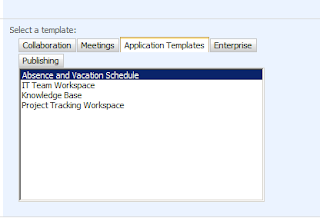
Create new site collection -->
Under application templates --> you will have your template(s)
:)
C:\Program Files\Common Files\microsoft shared\Web Server Extensions\12\BIN
then type
stsadm –o addsolution –filename ApplicationTemplateCore.wsp
stsadm –o deploysolution –name ApplicationTemplateCore.wsp -allowgacdeployment -local
stsadm -o copyappbincontent
then go to central administration --> Operations --> Solution management
You can see your solution there(ApplicationTemplateCore).
Now you have to add your necessary templates...
Same as early
stsadm –o addsolution –filename ApplicationTemplateCore.wsp
stsadm –o deploysolution –name ApplicationTemplateCore.wsp -allowgacdeployment -local
Now go to central administration with a hope !
Create new site collection -->
Under application templates --> you will have your template(s)
:)

Thursday, October 29, 2009

When we add controls dynamically, we are getting error like this.
Then we have to add this code to .ASPX file's code
public override void VerifyRenderingInServerForm(Control control)
{
Confirms that an HtmlForm control is rendered for the
specified ASP.NET server control at run time.
No code required here.
}
Then we are all works fine :) :) :)
read a .CSV file & create a dataset
protected void CreateImportDataSet()
{
if (FileUpload1.PostedFile.FileName == string.Empty)
{ lblMsg.Visible = true; return; }
else
{
//restrict user to upload other file extenstion
string[] FileExt = FileUpload1.FileName.Split('.');
string FileEx = FileExt[FileExt.Length - 1];
if (FileEx.ToLower() == "csv")
{
}
else { lblMsg.Visible = true; return; }
}
ArrayList counterOfUnNecessaryColumns = new ArrayList();
//create object for CSVReader and pass the stream
CSVReader reader = new CSVReader(FileUpload1.PostedFile.InputStream);
//get the header
string[] headers = reader.GetCSVLine(counterOfUnNecessaryColumns, 0);
DataTable dt = new DataTable();
ArrayList necessaryHeaders = new ArrayList();
necessaryHeaders.Add("First Name");
necessaryHeaders.Add("Middle Name");
necessaryHeaders.Add("Last Name");
necessaryHeaders.Add("Job Title");
necessaryHeaders.Add("E-mail Address");
necessaryHeaders.Add("Business Street");
necessaryHeaders.Add("Business City");
necessaryHeaders.Add("Business State");
necessaryHeaders.Add("Business Postal Code");
necessaryHeaders.Add("Mobile Phone");
necessaryHeaders.Add("Home Phone");
//add headers
for (int counter = 0; counter < headers.Length; counter++)
{
if (necessaryHeaders.Contains(headers[counter]))
{
dt.Columns.Add(headers[counter]);
}
else
{
counterOfUnNecessaryColumns.Add(counter);
}
}
dt.Columns.Add("PersonIndex");
string[] data;
int personIndex = 0;
while ((data = reader.GetCSVLine(counterOfUnNecessaryColumns, personIndex)) != null)
{
dt.Rows.Add(data);
personIndex++;
}
gv.DataSource = dt;
gv.DataBind();
dt.TableName = "MyContacts";
dt.WriteXml(@"D:/mad.xml");
Session["CsvDataSet"] = dt;
}
=====================================Base Class ====================================
using System;
using System.Data;
using System.Configuration;
using System.Web;
using System.Web.Security;
using System.Web.UI;
using System.Web.UI.WebControls;
using System.Web.UI.WebControls.WebParts;
using System.Web.UI.HtmlControls;
using System.IO;
using System.Text;
using System.Collections;
public class CSVReader
{
private Stream objStream;
private StreamReader objReader;
//add name space System.IO.Stream
public CSVReader(Stream filestream) : this(filestream, null) { }
public CSVReader(Stream filestream, Encoding enc)
{
this.objStream = filestream;
//check the Pass Stream whether it is readable or not
if (!filestream.CanRead)
{
return;
}
objReader = (enc != null) ? new StreamReader(filestream, enc) : new StreamReader(filestream);
}
//parse the Line
public string[] GetCSVLine(ArrayList counterOfNecessaryColumns,int personIndex)
{
string data = objReader.ReadLine();
if (data == null) return null;
if (data.Length == 0) return new string[0];
ArrayList result = new ArrayList();
//parsing CSV Data
ParseCSVData(result, data, counterOfNecessaryColumns,personIndex);
return (string[])result.ToArray(typeof(string));
}
private void ParseCSVData(ArrayList result, string data, ArrayList counterOfNecessaryColumns,int personIndex)
{
int position = -1;
while (position < data.Length)
result.Add(ParseCSVField(ref data, ref position));
//Removing Unnecessary columns
for (int i = 0; i < counterOfNecessaryColumns.Count; i++)
{
try
{
result.RemoveAt(int.Parse(counterOfNecessaryColumns[i].ToString()) - i);
}
catch { }
}
result.Add(personIndex.ToString());
}
private string ParseCSVField(ref string data, ref int StartSeperatorPos)
{
if (StartSeperatorPos == data.Length - 1)
{
StartSeperatorPos++;
return "";
}
int fromPos = StartSeperatorPos + 1;
if (data[fromPos] == '"')
{
int nextSingleQuote = GetSingleQuote(data, fromPos + 1);
int lines = 1;
while (nextSingleQuote == -1)
{
data = data + "\n" + objReader.ReadLine();
nextSingleQuote = GetSingleQuote(data, fromPos + 1);
lines++;
if (lines > 20)
throw new Exception("lines overflow: " + data);
}
StartSeperatorPos = nextSingleQuote + 1;
string tempString = data.Substring(fromPos + 1, nextSingleQuote - fromPos - 1);
tempString = tempString.Replace("'", "''");
return tempString.Replace("\"\"", "\"");
}
int nextComma = data.IndexOf(',', fromPos);
if (nextComma == -1)
{
StartSeperatorPos = data.Length;
return data.Substring(fromPos);
}
else
{
StartSeperatorPos = nextComma;
return data.Substring(fromPos, nextComma - fromPos);
}
}
private int GetSingleQuote(string data, int SFrom)
{
int i = SFrom - 1;
while (++i < data.Length)
if (data[i] == '"')
{
if (i < data.Length - 1 && data[i + 1] == '"')
{
i++;
continue;
}
else
return i;
}
return -1;
}
}
{
if (FileUpload1.PostedFile.FileName == string.Empty)
{ lblMsg.Visible = true; return; }
else
{
//restrict user to upload other file extenstion
string[] FileExt = FileUpload1.FileName.Split('.');
string FileEx = FileExt[FileExt.Length - 1];
if (FileEx.ToLower() == "csv")
{
}
else { lblMsg.Visible = true; return; }
}
ArrayList counterOfUnNecessaryColumns = new ArrayList();
//create object for CSVReader and pass the stream
CSVReader reader = new CSVReader(FileUpload1.PostedFile.InputStream);
//get the header
string[] headers = reader.GetCSVLine(counterOfUnNecessaryColumns, 0);
DataTable dt = new DataTable();
ArrayList necessaryHeaders = new ArrayList();
necessaryHeaders.Add("First Name");
necessaryHeaders.Add("Middle Name");
necessaryHeaders.Add("Last Name");
necessaryHeaders.Add("Job Title");
necessaryHeaders.Add("E-mail Address");
necessaryHeaders.Add("Business Street");
necessaryHeaders.Add("Business City");
necessaryHeaders.Add("Business State");
necessaryHeaders.Add("Business Postal Code");
necessaryHeaders.Add("Mobile Phone");
necessaryHeaders.Add("Home Phone");
//add headers
for (int counter = 0; counter < headers.Length; counter++)
{
if (necessaryHeaders.Contains(headers[counter]))
{
dt.Columns.Add(headers[counter]);
}
else
{
counterOfUnNecessaryColumns.Add(counter);
}
}
dt.Columns.Add("PersonIndex");
string[] data;
int personIndex = 0;
while ((data = reader.GetCSVLine(counterOfUnNecessaryColumns, personIndex)) != null)
{
dt.Rows.Add(data);
personIndex++;
}
gv.DataSource = dt;
gv.DataBind();
dt.TableName = "MyContacts";
dt.WriteXml(@"D:/mad.xml");
Session["CsvDataSet"] = dt;
}
=====================================Base Class ====================================
using System;
using System.Data;
using System.Configuration;
using System.Web;
using System.Web.Security;
using System.Web.UI;
using System.Web.UI.WebControls;
using System.Web.UI.WebControls.WebParts;
using System.Web.UI.HtmlControls;
using System.IO;
using System.Text;
using System.Collections;
public class CSVReader
{
private Stream objStream;
private StreamReader objReader;
//add name space System.IO.Stream
public CSVReader(Stream filestream) : this(filestream, null) { }
public CSVReader(Stream filestream, Encoding enc)
{
this.objStream = filestream;
//check the Pass Stream whether it is readable or not
if (!filestream.CanRead)
{
return;
}
objReader = (enc != null) ? new StreamReader(filestream, enc) : new StreamReader(filestream);
}
//parse the Line
public string[] GetCSVLine(ArrayList counterOfNecessaryColumns,int personIndex)
{
string data = objReader.ReadLine();
if (data == null) return null;
if (data.Length == 0) return new string[0];
ArrayList result = new ArrayList();
//parsing CSV Data
ParseCSVData(result, data, counterOfNecessaryColumns,personIndex);
return (string[])result.ToArray(typeof(string));
}
private void ParseCSVData(ArrayList result, string data, ArrayList counterOfNecessaryColumns,int personIndex)
{
int position = -1;
while (position < data.Length)
result.Add(ParseCSVField(ref data, ref position));
//Removing Unnecessary columns
for (int i = 0; i < counterOfNecessaryColumns.Count; i++)
{
try
{
result.RemoveAt(int.Parse(counterOfNecessaryColumns[i].ToString()) - i);
}
catch { }
}
result.Add(personIndex.ToString());
}
private string ParseCSVField(ref string data, ref int StartSeperatorPos)
{
if (StartSeperatorPos == data.Length - 1)
{
StartSeperatorPos++;
return "";
}
int fromPos = StartSeperatorPos + 1;
if (data[fromPos] == '"')
{
int nextSingleQuote = GetSingleQuote(data, fromPos + 1);
int lines = 1;
while (nextSingleQuote == -1)
{
data = data + "\n" + objReader.ReadLine();
nextSingleQuote = GetSingleQuote(data, fromPos + 1);
lines++;
if (lines > 20)
throw new Exception("lines overflow: " + data);
}
StartSeperatorPos = nextSingleQuote + 1;
string tempString = data.Substring(fromPos + 1, nextSingleQuote - fromPos - 1);
tempString = tempString.Replace("'", "''");
return tempString.Replace("\"\"", "\"");
}
int nextComma = data.IndexOf(',', fromPos);
if (nextComma == -1)
{
StartSeperatorPos = data.Length;
return data.Substring(fromPos);
}
else
{
StartSeperatorPos = nextComma;
return data.Substring(fromPos, nextComma - fromPos);
}
}
private int GetSingleQuote(string data, int SFrom)
{
int i = SFrom - 1;
while (++i < data.Length)
if (data[i] == '"')
{
if (i < data.Length - 1 && data[i + 1] == '"')
{
i++;
continue;
}
else
return i;
}
return -1;
}
}
Thursday, October 22, 2009
Reverse a String in easy manner
string myName = "chanaka";
char[] chars = myName.ToCharArray();
Array.Reverse(chars);
string newDat = new string(chars);
char[] chars = myName.ToCharArray();
Array.Reverse(chars);
string newDat = new string(chars);
Wednesday, October 21, 2009
Diffrence between WebSite & WebApplication projects in .NET
A web site is just a group of all files in a folder and sub folders.
There is no project file.
All files under the specific folder - including your word documents, text files, images etc are part of the web site.
We have to deploy all files including source files (unless you pre compile them) to the server.
Files are compiled dynamically during run time.
There will be no single assembly created and you will nto see a "Bin" folder.
The benefits of this model is, you do not need a project file or virtual directory to open a project.
Disadvantage is, all files under the folder and considered to be part of the web site[since there is no project file].
The only way you can exclude a file from the website within the same directory is by renaming them with the extension .exclude
Friday, October 9, 2009


Subscribe to:
Posts (Atom)