IIS logs all requests came from clients and writes to a text file. If webapp is heavily used, the folder size will be higher and it may create issues.
We can change the path and set more spaced disk to mitigate this issue.
Monday, March 5, 2012
Sunday, February 26, 2012
Create a timer job in SharePoint 2010
1. Create a SharePoint project using VS 2011

2. Add a class to the SharePoint project
3. Extends the class using "SPJobDefinition"
4. Add a custom constructor and Override "Execute" method
5. Add a "Feature" to the project
6. Add an "EventReceiver" to the feature
7. Create my custom "TimeJob" in the event of "FEATUREACTIVATED"
Can add "FeatureDeactivating" code also to event receiver
8. Build and Deploy the package
9. Can see the feature is being activated under "site collection features"
10. Can see the deployed timer job in "Job Definitions" in Central Administration
11. Can see the frequency of the job and its status by clicking on the "TimerJob" name
12. Can see the entries created in the "Custom List" by "TimerJob"
13.Can see the "JobHistory" with success message in "Job History" in CA
No headache. Cool and Simple :)
Friday, February 24, 2012
Configure SendTo for a Document Library in SharePoint 2010
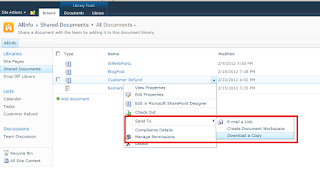
When needs to store our documents as a copy, we can configure 'Send To' option for a document library as well as for a SharePoint site.
1. Go to Document Library Settings
2. Advance settings
3.Set the 'Custom Send To Destination' option
4.Go to document library, click on the item
Monday, February 20, 2012
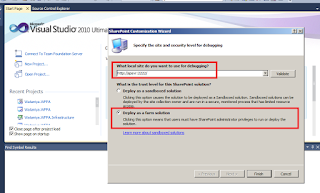
SPUserCodeV4 service not started when deploying a solution using Visual Studio
When we are trying to deploy a solution using visual studio,
it throws cannot start "SPUserCodeV4" service.
The solution is simple :)
Go to Services --> Start the service "SharePoint 2010 User Code Host"
Labels:
Sharepoint 2010,
SPUserCodeV4,
Visual studio
Thursday, February 16, 2012
Wednesday, February 15, 2012
Wednesday, February 8, 2012
Disable SharePoint Dialog Box PopUp and Redirect to a page
In SharePoint 2010 we are getting dialog box popup when we want to add / edit list item. But if we want to disable it, then
Subscribe to:
Posts (Atom)