About Me

My photo
a Dynamic and Energetic guy.....

Sunday, April 1, 2012

Manage Site Quota in SharePoint 2010

Central Administration --> Application Management --> Specify Quota templates
 

 Create a new quota template


                                                Application management --> Configure quota and locks

Select Web application --> select current quota template

Friday, March 16, 2012

Column ordering in SharePoint list

We are always dealing with Lists and we want to order columns in our way.
But we are surprised, we can't see "Column Ordering"


Go to List settings --> Advance settings --> Allow management of content types

Now we can see column ordering

Friday, March 9, 2012

Sync Active Directory Employee Information to SharePoint List


protected void Page_Load(object sender, EventArgs e)
        {                     
            string lDapDomainName = FriendlyDomainToLdapDomain("MIT.SPF.COM");
            SaveAllDepartmentsToList(GetAllAuthenticatedUsers(lDapDomainName));
            SaveDataToEmployeeList(GetAllAuthenticatedUsers(lDapDomainName));
        }

        //Get LDAP domain name
        public static string FriendlyDomainToLdapDomain(string friendlyDomainName)
        {
            string ldapPath = null;
            try
            {
                DirectoryContext objContext = new DirectoryContext(
                    DirectoryContextType.Domain, friendlyDomainName);
                Domain objDomain = Domain.GetDomain(objContext);
                ldapPath = objDomain.Name;
            }
            catch (DirectoryServicesCOMException e)
            {
                ldapPath = e.Message.ToString();
            }
            return ldapPath;
        }       

        //Get all users from AD
        private List<Principal> GetAllAuthenticatedUsers(string domainName)
        {
            List<Principal> lstUsers = new List<Principal>();

            try
            {
                PrincipalContext context = new PrincipalContext(ContextType.Domain, domainName);
                // Create search condition for all enabled users
                PrincipalSearcher searcher = new PrincipalSearcher();
                UserPrincipal user = new UserPrincipal(context);
                user.Enabled = true;
                user.Name = "*";
                searcher.QueryFilter = user;

                // Get the users
                System.DirectoryServices.AccountManagement.PrincipalSearchResult<Principal> results = searcher.FindAll();
                foreach (Principal principal in results)
                {
                    lstUsers.Add(principal);
                }
            }
            catch
            {
            }
            return lstUsers;
        }

        //Save all departments(Insert/Update)
        private void SaveAllDepartmentsToList(List<Principal> allUsers)
        {
            using (SPSite site = new SPSite(SPContext.Current.Web.Url))
            {
                using (SPWeb web = site.OpenWeb())
                {
                    SPList list = web.Lists["Department"];
                    Hashtable objHash = new Hashtable();

                    //GET all departments using AD
                    foreach (Principal objP in allUsers)
                    {
                        DirectoryEntry dirEntry = (objP.GetUnderlyingObject() as DirectoryEntry);
                        if (dirEntry != null)
                        {
                            if (dirEntry.Properties.Contains("department"))
                            {
                                if (!objHash.ContainsKey(dirEntry.Properties["department"].Value))
                                {
                                    objHash.Add(dirEntry.Properties["department"].Value, dirEntry.Properties["department"].Value);
                                }
                            }
                        }
                    }

                    foreach (string depName in objHash.Keys)
                    {
                        SPItem item = GetCorrectListItemOrNewListItem(depName, list);

                        //Save all departments to List
                        item["Title"] = depName;
                        item["Name"] = depName;
                        item["Active"] = true;
                        web.AllowUnsafeUpdates = true;
                        item.Update();
                        web.AllowUnsafeUpdates = false;

                    }
                }
            }
        }

        //Save Employee inforamtion(Insert/Update)
        private void SaveDataToEmployeeList(List<Principal> allUsers)
        {
            using (SPSite site = new SPSite(SPContext.Current.Web.Url))
            {
                using (SPWeb web = site.OpenWeb())
                {
                    SPList empList = web.Lists["Employee"];

                    //Set all departments using AD
                    foreach (Principal objP in allUsers)
                    {
                        DirectoryEntry de = (objP.GetUnderlyingObject() as DirectoryEntry);
                        if (de != null)
                        {
                            SPListItem item = null;

                            if (de.Properties.Contains("givenName") && de.Properties.Contains("department"))
                            {
                                item = GetCorrectListItemOrNewListItem(de.Properties["givenName"].Value.ToString(), empList);
                                SPList depList = web.Lists["Department"];
                                item["Department"] = CreateEmployeeDepartmentLookupString(de.Properties["department"].Value.ToString(), depList);
                            }
                            else//No name || No department, can't add to the system
                            {
                                continue;
                            }
                            if (de.Properties.Contains("manager"))
                            {
                                string ibName = de.Properties["manager"].Value.ToString().Split(',')[0];
                                ibName = ibName.Remove(0, 3);//Removing 'CN='
                                SPUser ibUser = SPContext.Current.Web.EnsureUser(ibName);
                                item["Immediate Superior"] = ibUser;
                            }
                            if (de.Properties.Contains("givenName"))
                            {
                                item["First Name"] = de.Properties["givenName"].Value;
                            }
                            if (de.Properties.Contains("sn"))
                            {
                                item["Last Name"] = de.Properties["sn"].Value;
                            }
                            if (de.Properties.Contains("telephoneNumber"))
                            {
                                item["Mobile Number"] = de.Properties["telephoneNumber"].Value;
                            }
                            if (de.Properties.Contains("mail"))
                            {
                                item["Email"] = de.Properties["mail"].Value;
                            }

                            item["Title"] = de.Properties["givenName"].Value;
                            item["Active"] = true;
                            web.AllowUnsafeUpdates = true;
                            item.Update();
                            web.AllowUnsafeUpdates = false;
                        }
                    }
                }
            }
        }

        private SPListItem GetCorrectListItemOrNewListItem(string entryName, SPList empList)
        {
            SPQuery query = new SPQuery();
            query.Query = "" + entryName + "";
            SPListItemCollection objCol = empList.GetItems(query);
            SPListItem empItem = null;
            if (objCol != null && objCol.Count > 0)
            {
                //Return current item
                empItem = objCol[0];
            }
            else
            {
                //no data found, so creating new item
                empItem = empList.Items.Add();
            }
            return empItem;
        }

        //Create Lookup between "Employee" list and "Department" list
        private string CreateEmployeeDepartmentLookupString(string entryName, SPList depList)
        {
            SPQuery query = new SPQuery();
            query.Query = "" + entryName + "";
            SPListItemCollection objCol = depList.GetItems(query);
            if (objCol != null && objCol.Count >= 1)
            {
                SPListItem depItem = objCol[0];
                string depName = depItem["Name"].ToString();
                int spItemID = depItem.ID;
                return spItemID.ToString() + ";#" + depName;
            }
            else
                return string.Empty;
        }
All Departments
 

All Employees with lookup department and Manager
 

Monday, March 5, 2012

Configure IIS Logging path

IIS logs all requests came from clients and writes to a text file. If webapp is heavily used, the folder size will be higher and it may create issues.
We can change the path and set more spaced disk to mitigate this issue.


Sunday, February 26, 2012

Create a timer job in SharePoint 2010

1. Create a SharePoint project using VS 2011

2. Add a class to the SharePoint project

3. Extends the class using "SPJobDefinition"

4. Add a custom constructor and Override "Execute" method


5. Add a "Feature" to the project


6. Add an "EventReceiver" to the feature

7. Create my custom "TimeJob" in the event of "FEATUREACTIVATED"
Can add "FeatureDeactivating"  code also to event receiver

8. Build and Deploy the package

9. Can see the feature is being activated under "site collection features"

10. Can see the deployed timer job in "Job Definitions" in Central Administration

11. Can see the frequency of the job and its status by clicking on the "TimerJob" name

12. Can see the entries created in the "Custom List" by "TimerJob"

13.Can see the "JobHistory" with success message in "Job History" in CA


No headache. Cool and Simple :)


Friday, February 24, 2012

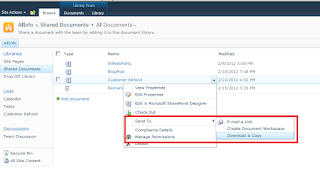
Configure SendTo for a Document Library in SharePoint 2010

When needs to store our documents as a copy, we can configure 'Send To' option for a document library as well as for a SharePoint site.
 
1. Go to Document Library Settings 
2. Advance settings
3.Set the 'Custom Send To Destination' option
4.Go to document library, click on the item


Monday, February 20, 2012

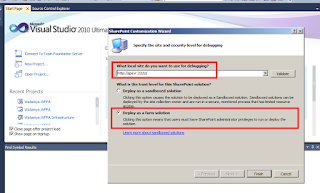
SPUserCodeV4 service not started when deploying a solution using Visual Studio

When we are trying to deploy a solution using visual studio,
it throws  cannot start "SPUserCodeV4" service.

The solution is simple :)
Go to Services --> Start the service "SharePoint 2010 User Code Host"

My Masters