
| SharePoint 2010 Foundation | Business Data Connectivity Service |
| | Security Token Service |
| | Usage and health data collection service |
| | Web analytic service |
| | |
| SharePoint 2010 Standard | Managed meta data service |
| | Search service |
| | Secure store service |
| | State service |
| | User profile service |
| | |
| SharePoint 2010 Enterprise | Access service |
| | Excel service |
| | Word automation service |
| | PerformancePoint service |
| | Visio service |
Thursday, April 12, 2012
SharePoint 2010 servie applications comes with foundation, standard and enterprise versions

Thursday, April 5, 2012
Configure Additional Content Database for a SharePoin 2010 web application
we have one web application, one database


Can see the created database in SQL management studio also


we want to have another database for current web applcation
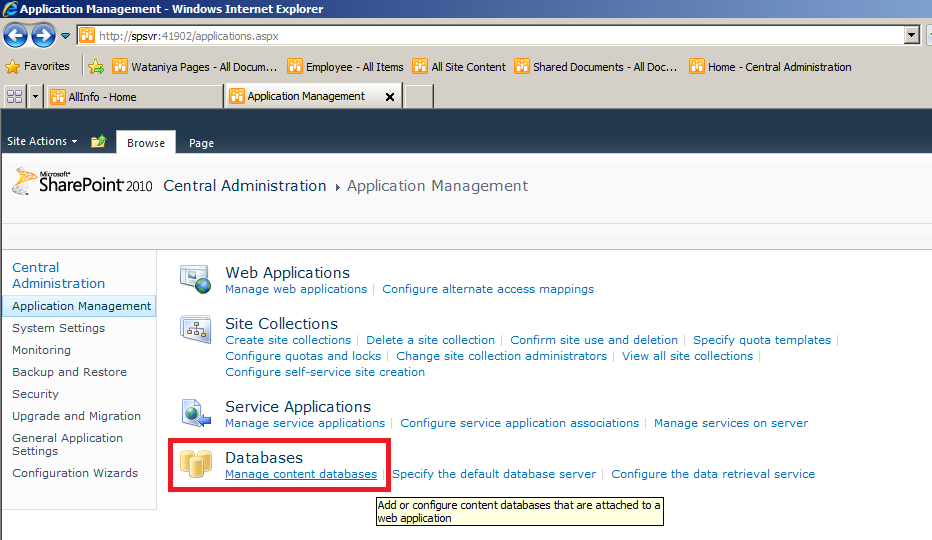
Central administration --> manage content databases

Create another content database

Can see the newly created database in centarl administration


View current databases and site collections related with them in CA

Now create a site collection

Can see the newly created site relates with additional content database
It is hazard free. No problems with large size content databases. No issues with backup, restore process of web applications.
Sunday, April 1, 2012
Manage Site Quota in SharePoint 2010
Central Administration --> Application Management --> Specify Quota templates

Create a new quota template

Application management --> Configure quota and locks

Select Web application --> select current quota template

Friday, March 16, 2012
Column ordering in SharePoint list
We are always dealing with Lists and we want to order columns in our way.
But we are surprised, we can't see "Column Ordering"

Go to List settings --> Advance settings --> Allow management of content types

Now we can see column ordering

Friday, March 9, 2012
Sync Active Directory Employee Information to SharePoint List

protected void Page_Load(object sender, EventArgs e)
{
string lDapDomainName = FriendlyDomainToLdapDomain("MIT.SPF.COM");
SaveAllDepartmentsToList(GetAllAuthenticatedUsers(lDapDomainName));
SaveDataToEmployeeList(GetAllAuthenticatedUsers(lDapDomainName));
}
//Get LDAP domain name
public static string FriendlyDomainToLdapDomain(string friendlyDomainName)
{
string ldapPath = null;
try
{
DirectoryContext objContext = new DirectoryContext(
DirectoryContextType.Domain, friendlyDomainName);
Domain objDomain = Domain.GetDomain(objContext);
ldapPath = objDomain.Name;
}
catch (DirectoryServicesCOMException e)
{
ldapPath = e.Message.ToString();
}
return ldapPath;
}
//Get all users from AD
private List<Principal> GetAllAuthenticatedUsers(string domainName)
{
List<Principal> lstUsers = new List<Principal>();
try
{
PrincipalContext context = new PrincipalContext(ContextType.Domain, domainName);
// Create search condition for all enabled users
PrincipalSearcher searcher = new PrincipalSearcher();
UserPrincipal user = new UserPrincipal(context);
user.Enabled = true;
user.Name = "*";
searcher.QueryFilter = user;
// Get the users
System.DirectoryServices.AccountManagement.PrincipalSearchResult<Principal> results = searcher.FindAll();
foreach (Principal principal in results)
{
lstUsers.Add(principal);
}
}
catch
{
}
return lstUsers;
}
//Save all departments(Insert/Update)
private void SaveAllDepartmentsToList(List<Principal> allUsers)
{
using (SPSite site = new SPSite(SPContext.Current.Web.Url))
{
using (SPWeb web = site.OpenWeb())
{
SPList list = web.Lists["Department"];
Hashtable objHash = new Hashtable();
//GET all departments using AD
foreach (Principal objP in allUsers)
{
DirectoryEntry dirEntry = (objP.GetUnderlyingObject() as DirectoryEntry);
if (dirEntry != null)
{
if (dirEntry.Properties.Contains("department"))
{
if (!objHash.ContainsKey(dirEntry.Properties["department"].Value))
{
objHash.Add(dirEntry.Properties["department"].Value, dirEntry.Properties["department"].Value);
}
}
}
}
foreach (string depName in objHash.Keys)
{
SPItem item = GetCorrectListItemOrNewListItem(depName, list);
//Save all departments to List
item["Title"] = depName;
item["Name"] = depName;
item["Active"] = true;
web.AllowUnsafeUpdates = true;
item.Update();
web.AllowUnsafeUpdates = false;
}
}
}
}
//Save Employee inforamtion(Insert/Update)
private void SaveDataToEmployeeList(List<Principal> allUsers)
{
using (SPSite site = new SPSite(SPContext.Current.Web.Url))
{
using (SPWeb web = site.OpenWeb())
{
SPList empList = web.Lists["Employee"];
//Set all departments using AD
foreach (Principal objP in allUsers)
{
DirectoryEntry de = (objP.GetUnderlyingObject() as DirectoryEntry);
if (de != null)
{
SPListItem item = null;
if (de.Properties.Contains("givenName") && de.Properties.Contains("department"))
{
item = GetCorrectListItemOrNewListItem(de.Properties["givenName"].Value.ToString(), empList);
SPList depList = web.Lists["Department"];
item["Department"] = CreateEmployeeDepartmentLookupString(de.Properties["department"].Value.ToString(), depList);
}
else//No name || No department, can't add to the system
{
continue;
}
if (de.Properties.Contains("manager"))
{
string ibName = de.Properties["manager"].Value.ToString().Split(',')[0];
ibName = ibName.Remove(0, 3);//Removing 'CN='
SPUser ibUser = SPContext.Current.Web.EnsureUser(ibName);
item["Immediate Superior"] = ibUser;
}
if (de.Properties.Contains("givenName"))
{
item["First Name"] = de.Properties["givenName"].Value;
}
if (de.Properties.Contains("sn"))
{
item["Last Name"] = de.Properties["sn"].Value;
}
if (de.Properties.Contains("telephoneNumber"))
{
item["Mobile Number"] = de.Properties["telephoneNumber"].Value;
}
if (de.Properties.Contains("mail"))
{
item["Email"] = de.Properties["mail"].Value;
}
item["Title"] = de.Properties["givenName"].Value;
item["Active"] = true;
web.AllowUnsafeUpdates = true;
item.Update();
web.AllowUnsafeUpdates = false;
}
}
}
}
}
private SPListItem GetCorrectListItemOrNewListItem(string entryName, SPList empList)
{
SPQuery query = new SPQuery();
query.Query = ""
SPListItemCollection objCol = empList.GetItems(query);
SPListItem empItem = null;
if (objCol != null && objCol.Count > 0)
{
//Return current item
empItem = objCol[0];
}
else
{
//no data found, so creating new item
empItem = empList.Items.Add();
}
return empItem;
}
//Create Lookup between "Employee" list and "Department" list
private string CreateEmployeeDepartmentLookupString(string entryName, SPList depList)
{
SPQuery query = new SPQuery();
query.Query = ""
SPListItemCollection objCol = depList.GetItems(query);
if (objCol != null && objCol.Count >= 1)
{
SPListItem depItem = objCol[0];
string depName = depItem["Name"].ToString();
int spItemID = depItem.ID;
return spItemID.ToString() + ";#" + depName;
}
else
return string.Empty;
}
All Departments


Monday, March 5, 2012
Configure IIS Logging path
IIS logs all requests came from clients and writes to a text file. If webapp is heavily used, the folder size will be higher and it may create issues.
We can change the path and set more spaced disk to mitigate this issue.


We can change the path and set more spaced disk to mitigate this issue.


Subscribe to:
Posts (Atom)