
With Sharepoint 2010 we are getting few new features as well as many enhancements.
(1) Development & deployement enhancements
Creation of Webparts using VS 2010
Easy deployment of features
(2) Administration interface & user experience
User friendly Central Admin Interface
Ajax enabled pages
Modal Popup & less postbacks
Ribbon interface
(3) Performance management
More templates
Easy Search
Easy SSP (Shared Services Providers)
Database backup & restore
Performance analyzing
Also we are getting new features in differen layers
Data Modules -- Data fetch from External Lists
Server API's -- LING
Connected Client API's -- REST
Pages & UI -- Silverlight
Wednesday, August 18, 2010

Thursday, August 12, 2010
SQL Server Reporting Services Expressions
Table Row Visibility by value
=iif(Fields!PctQuota.Value>.9, False, True)
Field Visibility when data is null
=iif(Fields!vendorSolicitor.Value Is Nothing, True, False)
Set Data Field Values
=iif(Fields!ExchangeDate.Value Is Nothing,"",FormatDateTime(Fields!ExchangeDate.Value ,2))
SWITCH
=Switch
(
Fields!PropertyCategory.Value="N" and sum(Fields!newHouseCount.Value) > 0, sum(Fields!newHouseCount.Value),
Fields!PropertyCategory.Value="E" and sum(Fields!estHouseCount.Value) > 0, sum(Fields!estHouseCount.Value)
)
Format date
=iif(Fields!ExchangeDate.Value Is Nothing,"",FormatDateTime(Fields!ExchangeDate.Value ,2))
Format Decimal values(Drop decimal places than rounding)
=FormatCurrency(Floor(Sum(Fields!ExpectedAgencyCommission.Value)),0)
=iif(Fields!PctQuota.Value>.9, False, True)
Field Visibility when data is null
=iif(Fields!vendorSolicitor.Value Is Nothing, True, False)
Set Data Field Values
=iif(Fields!ExchangeDate.Value Is Nothing,"",FormatDateTime(Fields!ExchangeDate.Value ,2))
SWITCH
=Switch
(
Fields!PropertyCategory.Value="N" and sum(Fields!newHouseCount.Value) > 0, sum(Fields!newHouseCount.Value),
Fields!PropertyCategory.Value="E" and sum(Fields!estHouseCount.Value) > 0, sum(Fields!estHouseCount.Value)
)
Format date
=iif(Fields!ExchangeDate.Value Is Nothing,"",FormatDateTime(Fields!ExchangeDate.Value ,2))
Format Decimal values(Drop decimal places than rounding)
=FormatCurrency(Floor(Sum(Fields!ExpectedAgencyCommission.Value)),0)
Tuesday, August 3, 2010
Site Navigation using Tree View
Drop Tree View Control Form Navigation Tab

Bind Data Source Type to Tree View (Add "Site Map" source)

Add New Item --> Add "SiteMap" from VS templates (extension will be test.sitemap)

Add pages and title of pages to show on Tree View in "test.sitemap"

Wednesday, July 14, 2010
Sharepoint 2010 Web Analytics
Site settings--> Site Actions--> Site Web Analytics reports

Top bar --> Change Settings

Analyze --> Preceding 7 /30 days

Left panel --> Top Pages

Left panel --> Top visitors

Left panel --> Top Browsers

Thursday, July 8, 2010
TFS Burndown report does not show data - Solution
Burndown report show empty data

Open Report in Excel in Edit Mode, Allow Data populate set as "trust data connection" in excel

Click on the pivot table data area, then see right side column, see that "Row Labels" box is empty

Drag & drop "Last 4 weeks" from Date--> Sets --> "Last 4 weeks"
Row Labels (This box use to show horizontal bar information in your graph)

Then Save the excel sheet. You will get data in your Burndown report when you refresh your page. J
Sunday, June 13, 2010
Sharepoint backup script
(1) Open notepad
(2) type following command
@echo
echo Back up the farm to "Optimus\Share"
echo ===============================================================
For /F "tokens=1,2,3 delims=/ " %%A in ('Date /t') do (
Set Day=%%A
Set Month=%%B
Set Year=%%C
Set todayDate=%%C%%B%%A
)
set WORKINGFOLDER="C:\Program Files\Common Files\Microsoft Shared\Web Server Extensions\14\BIN"
pushd "%WORKINGFOLDER:"=%"
cd C:\Program Files\Common Files\Microsoft Shared\Web Server Extensions\14\BIN
echo Starting Backup ========================
stsadm -o backup -url http://optimus:3333 -filename \\Optimus\Share\SharepointPortalBackup_%todayDate%.bak -overwrite
pause
(3) Save the file as .bat or .cmd
(4) Run & test (This will create a backup with the date (SharepointPortalBackup_1406Mon.bak) )
(5) Add a "Task Scheduler" in server
:) :) :) Simple
(2) type following command
@echo
echo Back up the farm to "Optimus\Share"
echo ===============================================================
For /F "tokens=1,2,3 delims=/ " %%A in ('Date /t') do (
Set Day=%%A
Set Month=%%B
Set Year=%%C
Set todayDate=%%C%%B%%A
)
set WORKINGFOLDER="C:\Program Files\Common Files\Microsoft Shared\Web Server Extensions\14\BIN"
pushd "%WORKINGFOLDER:"=%"
cd C:\Program Files\Common Files\Microsoft Shared\Web Server Extensions\14\BIN
echo Starting Backup ========================
stsadm -o backup -url http://optimus:3333 -filename \\Optimus\Share\SharepointPortalBackup_%todayDate%.bak -overwrite
pause
(3) Save the file as .bat or .cmd
(4) Run & test (This will create a backup with the date (SharepointPortalBackup_1406Mon.bak) )
(5) Add a "Task Scheduler" in server
:) :) :) Simple
Sharepoint Central Administration WebSite Not Working - Solution
It was a nightmare when we lost central administration website.
All other websites worked fine.
When we click "Central Administration 2010" we got only,

We had to use command to get this up & running
(1) Run Command prompt
(2) cd C:\Program Files\Common Files\Microsoft Shared\W
eb Server Extensions\14\BIN
(3) C:\Program Files\Common Files\Microsoft Shared\Web Server Extensions\14\BIN>
Psconfig -cmd adminvs -provision -port 33633 -windowsauthprovider onlyusentlm
Here 33633 = Port number of central administration website

It takes little time & finally you will get your your central admin site :)

Easy Work now :) :) :)
All other websites worked fine.
When we click "Central Administration 2010" we got only,

We had to use command to get this up & running
(1) Run Command prompt
(2) cd C:\Program Files\Common Files\Microsoft Shared\W
eb Server Extensions\14\BIN
(3) C:\Program Files\Common Files\Microsoft Shared\Web Server Extensions\14\BIN>
Psconfig -cmd adminvs -provision -port 33633 -windowsauthprovider onlyusentlm
Here 33633 = Port number of central administration website

It takes little time & finally you will get your your central admin site :)

Easy Work now :) :) :)
Tuesday, June 8, 2010
Search in Sharepoint 2010 - New features
So it is time to have a look on search function that comes with sharepoint 2010.
With the sharepoint 2007 we had little work to get our search function done. (create a Search site, SSP configuration & crawling rule)
But now it is really simple.
It has additional functions that help user very much.
SEARCH(find_text,within_text,start_num)
Find_text is the text you want to find. You can use the wildcard characters — question mark (?) and asterisk (*) in find_text. A question mark matches any single character; an asterisk matches any sequence of characters. If you want to find an actual question mark or asterisk, type a tilde (~) before the character.
Within_text is the text in which you want to search for find_text.
Start_num is the character number in within_text at which you want to start searching. Use start_num to skip a specified number of characters.
For example, suppose you are working with the text string "AYF0093.YoungMensApparel". To find the number of the first "Y" in the descriptive part of the text string, set start_num equal to 8 so that the serial-number portion of the text is not searched. SEARCH begins with character 8, finds find_text at the next character, and returns the number 9. SEARCH always returns the number of characters from the start of within_text, counting the characters you skip if start_num is greater than 1.

Special Points in Search of Sharepoint 2010
1. SEARCH does not distinguish between uppercase and lowercase letters when searching text.
2. SEARCH is similar to FIND except that FIND is case sensitive.
3. If find_text is not found, the #VALUE! error value is returned.
4. If start_num is omitted, it is assumed to be 1.
5. If start_num is not greater than 0 (zero) or is greater than the length of within_text, the #VALUE! error value is returned.
there are 3 types of search on SharePoint 2010
* Boolean Search
you can use AND, NOT and OR in your search queries. Be mindful though that you need to use capitals, otherwise they will considered additional search words.
* Wildcard Search
Search queries can now match a wildcard at the end of a text string.

* Faceted Search
When a search query returns a lot of results the faceted search functionality displays a refinement panel on the left side of the screen. In the panel you can refine the results based on criteria like Result type, Site, Author, Modified Date and Tags. What refinement possibilities are shown depends on the result set. Administrators can also configure other the categories that are used in the refinement panel based on managed properties and enterprise content management taxonomy nodes.
Finally we can add our portal as a "search connector to windows", that means it will search web url when we want to search a document :) :) :) :)

With the sharepoint 2007 we had little work to get our search function done. (create a Search site, SSP configuration & crawling rule)
But now it is really simple.
It has additional functions that help user very much.
SEARCH(find_text,within_text,start_num)
Find_text is the text you want to find. You can use the wildcard characters — question mark (?) and asterisk (*) in find_text. A question mark matches any single character; an asterisk matches any sequence of characters. If you want to find an actual question mark or asterisk, type a tilde (~) before the character.
Within_text is the text in which you want to search for find_text.
Start_num is the character number in within_text at which you want to start searching. Use start_num to skip a specified number of characters.
For example, suppose you are working with the text string "AYF0093.YoungMensApparel". To find the number of the first "Y" in the descriptive part of the text string, set start_num equal to 8 so that the serial-number portion of the text is not searched. SEARCH begins with character 8, finds find_text at the next character, and returns the number 9. SEARCH always returns the number of characters from the start of within_text, counting the characters you skip if start_num is greater than 1.

Special Points in Search of Sharepoint 2010
1. SEARCH does not distinguish between uppercase and lowercase letters when searching text.
2. SEARCH is similar to FIND except that FIND is case sensitive.
3. If find_text is not found, the #VALUE! error value is returned.
4. If start_num is omitted, it is assumed to be 1.
5. If start_num is not greater than 0 (zero) or is greater than the length of within_text, the #VALUE! error value is returned.
there are 3 types of search on SharePoint 2010
* Boolean Search
you can use AND, NOT and OR in your search queries. Be mindful though that you need to use capitals, otherwise they will considered additional search words.
* Wildcard Search
Search queries can now match a wildcard at the end of a text string.

* Faceted Search
When a search query returns a lot of results the faceted search functionality displays a refinement panel on the left side of the screen. In the panel you can refine the results based on criteria like Result type, Site, Author, Modified Date and Tags. What refinement possibilities are shown depends on the result set. Administrators can also configure other the categories that are used in the refinement panel based on managed properties and enterprise content management taxonomy nodes.
Finally we can add our portal as a "search connector to windows", that means it will search web url when we want to search a document :) :) :) :)

Friday, June 4, 2010
Recover Sharepoint Documents from backedup DB
We have lost our sharepoint portal + all other data bases.
Then we had to get data from our backup DB.
To get this data i have written a application.
It gets all files other than images (sharepoint) & unwanted files.
This also create folder structure according to portal.
Simple application :) :) :) :)
Download Direct Application
Download App through megashare
Then we had to get data from our backup DB.
To get this data i have written a application.
It gets all files other than images (sharepoint) & unwanted files.
This also create folder structure according to portal.
Simple application :) :) :) :)
Download Direct Application
Download App through megashare
Tfs Backup Restore
(1) Backup all TFS Databases to physical location (D:\TfsBackups)
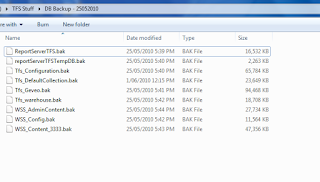
(2) Restore all the databases to TFS2010’s instance of SQL Server
(3) Run following command in cmd as administrator
C:\Program Files\Microsoft Team Foundation Server 2010\Tools>TFSConfig RemapDBs
/DatabaseName:Testsvr;Tfs_configuration /SQLInstances:testsvr /continue
(Continue is really important, if fails first time then run it again)
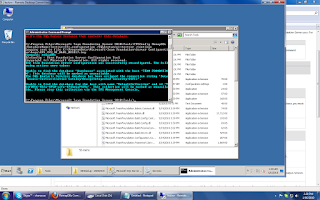
(3) Install Team Foundation Server 2010
(4) After the install has completed the Team Foundation Server Configuration Wizard will open
Select Upgrade | Start Wizard
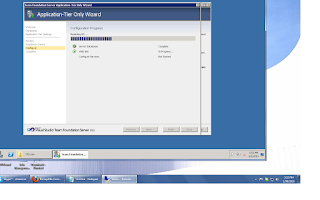
(If you run Basic/Standard/Advance option other than Upgrade, you will get following error)
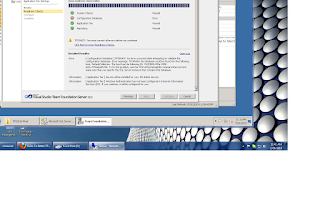
(5) Now you can go to "team foundation administration console"
You will see all your team collections
(6) Finally connects to the Team Server through Team Explorer
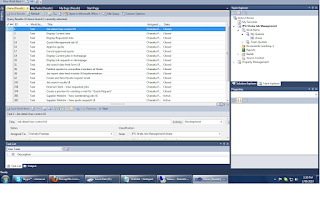 :) :) :) :)

(2) Restore all the databases to TFS2010’s instance of SQL Server
(3) Run following command in cmd as administrator
C:\Program Files\Microsoft Team Foundation Server 2010\Tools>TFSConfig RemapDBs
/DatabaseName:Testsvr;Tfs_configuration /SQLInstances:testsvr /continue
(Continue is really important, if fails first time then run it again)

(3) Install Team Foundation Server 2010
(4) After the install has completed the Team Foundation Server Configuration Wizard will open
Select Upgrade | Start Wizard

(If you run Basic/Standard/Advance option other than Upgrade, you will get following error)

(5) Now you can go to "team foundation administration console"
You will see all your team collections
(6) Finally connects to the Team Server through Team Explorer
 :) :) :) :)
Subscribe to:
Posts (Atom)