
(1) Open notepad
(2) type following command
@echo
echo Back up the farm to "Optimus\Share"
echo ===============================================================
For /F "tokens=1,2,3 delims=/ " %%A in ('Date /t') do (
Set Day=%%A
Set Month=%%B
Set Year=%%C
Set todayDate=%%C%%B%%A
)
set WORKINGFOLDER="C:\Program Files\Common Files\Microsoft Shared\Web Server Extensions\14\BIN"
pushd "%WORKINGFOLDER:"=%"
cd C:\Program Files\Common Files\Microsoft Shared\Web Server Extensions\14\BIN
echo Starting Backup ========================
stsadm -o backup -url http://optimus:3333 -filename \\Optimus\Share\SharepointPortalBackup_%todayDate%.bak -overwrite
pause
(3) Save the file as .bat or .cmd
(4) Run & test (This will create a backup with the date (SharepointPortalBackup_1406Mon.bak) )
(5) Add a "Task Scheduler" in server
:) :) :) Simple
Sunday, June 13, 2010

Sharepoint Central Administration WebSite Not Working - Solution
It was a nightmare when we lost central administration website.
All other websites worked fine.
When we click "Central Administration 2010" we got only,

We had to use command to get this up & running
(1) Run Command prompt
(2) cd C:\Program Files\Common Files\Microsoft Shared\W
eb Server Extensions\14\BIN
(3) C:\Program Files\Common Files\Microsoft Shared\Web Server Extensions\14\BIN>
Psconfig -cmd adminvs -provision -port 33633 -windowsauthprovider onlyusentlm
Here 33633 = Port number of central administration website

It takes little time & finally you will get your your central admin site :)

Easy Work now :) :) :)
All other websites worked fine.
When we click "Central Administration 2010" we got only,

We had to use command to get this up & running
(1) Run Command prompt
(2) cd C:\Program Files\Common Files\Microsoft Shared\W
eb Server Extensions\14\BIN
(3) C:\Program Files\Common Files\Microsoft Shared\Web Server Extensions\14\BIN>
Psconfig -cmd adminvs -provision -port 33633 -windowsauthprovider onlyusentlm
Here 33633 = Port number of central administration website

It takes little time & finally you will get your your central admin site :)

Easy Work now :) :) :)
Tuesday, June 8, 2010
Search in Sharepoint 2010 - New features
So it is time to have a look on search function that comes with sharepoint 2010.
With the sharepoint 2007 we had little work to get our search function done. (create a Search site, SSP configuration & crawling rule)
But now it is really simple.
It has additional functions that help user very much.
SEARCH(find_text,within_text,start_num)
Find_text is the text you want to find. You can use the wildcard characters — question mark (?) and asterisk (*) in find_text. A question mark matches any single character; an asterisk matches any sequence of characters. If you want to find an actual question mark or asterisk, type a tilde (~) before the character.
Within_text is the text in which you want to search for find_text.
Start_num is the character number in within_text at which you want to start searching. Use start_num to skip a specified number of characters.
For example, suppose you are working with the text string "AYF0093.YoungMensApparel". To find the number of the first "Y" in the descriptive part of the text string, set start_num equal to 8 so that the serial-number portion of the text is not searched. SEARCH begins with character 8, finds find_text at the next character, and returns the number 9. SEARCH always returns the number of characters from the start of within_text, counting the characters you skip if start_num is greater than 1.

Special Points in Search of Sharepoint 2010
1. SEARCH does not distinguish between uppercase and lowercase letters when searching text.
2. SEARCH is similar to FIND except that FIND is case sensitive.
3. If find_text is not found, the #VALUE! error value is returned.
4. If start_num is omitted, it is assumed to be 1.
5. If start_num is not greater than 0 (zero) or is greater than the length of within_text, the #VALUE! error value is returned.
there are 3 types of search on SharePoint 2010
* Boolean Search
you can use AND, NOT and OR in your search queries. Be mindful though that you need to use capitals, otherwise they will considered additional search words.
* Wildcard Search
Search queries can now match a wildcard at the end of a text string.

* Faceted Search
When a search query returns a lot of results the faceted search functionality displays a refinement panel on the left side of the screen. In the panel you can refine the results based on criteria like Result type, Site, Author, Modified Date and Tags. What refinement possibilities are shown depends on the result set. Administrators can also configure other the categories that are used in the refinement panel based on managed properties and enterprise content management taxonomy nodes.
Finally we can add our portal as a "search connector to windows", that means it will search web url when we want to search a document :) :) :) :)

With the sharepoint 2007 we had little work to get our search function done. (create a Search site, SSP configuration & crawling rule)
But now it is really simple.
It has additional functions that help user very much.
SEARCH(find_text,within_text,start_num)
Find_text is the text you want to find. You can use the wildcard characters — question mark (?) and asterisk (*) in find_text. A question mark matches any single character; an asterisk matches any sequence of characters. If you want to find an actual question mark or asterisk, type a tilde (~) before the character.
Within_text is the text in which you want to search for find_text.
Start_num is the character number in within_text at which you want to start searching. Use start_num to skip a specified number of characters.
For example, suppose you are working with the text string "AYF0093.YoungMensApparel". To find the number of the first "Y" in the descriptive part of the text string, set start_num equal to 8 so that the serial-number portion of the text is not searched. SEARCH begins with character 8, finds find_text at the next character, and returns the number 9. SEARCH always returns the number of characters from the start of within_text, counting the characters you skip if start_num is greater than 1.

Special Points in Search of Sharepoint 2010
1. SEARCH does not distinguish between uppercase and lowercase letters when searching text.
2. SEARCH is similar to FIND except that FIND is case sensitive.
3. If find_text is not found, the #VALUE! error value is returned.
4. If start_num is omitted, it is assumed to be 1.
5. If start_num is not greater than 0 (zero) or is greater than the length of within_text, the #VALUE! error value is returned.
there are 3 types of search on SharePoint 2010
* Boolean Search
you can use AND, NOT and OR in your search queries. Be mindful though that you need to use capitals, otherwise they will considered additional search words.
* Wildcard Search
Search queries can now match a wildcard at the end of a text string.

* Faceted Search
When a search query returns a lot of results the faceted search functionality displays a refinement panel on the left side of the screen. In the panel you can refine the results based on criteria like Result type, Site, Author, Modified Date and Tags. What refinement possibilities are shown depends on the result set. Administrators can also configure other the categories that are used in the refinement panel based on managed properties and enterprise content management taxonomy nodes.
Finally we can add our portal as a "search connector to windows", that means it will search web url when we want to search a document :) :) :) :)

Friday, June 4, 2010
Recover Sharepoint Documents from backedup DB
We have lost our sharepoint portal + all other data bases.
Then we had to get data from our backup DB.
To get this data i have written a application.
It gets all files other than images (sharepoint) & unwanted files.
This also create folder structure according to portal.
Simple application :) :) :) :)
Download Direct Application
Download App through megashare
Then we had to get data from our backup DB.
To get this data i have written a application.
It gets all files other than images (sharepoint) & unwanted files.
This also create folder structure according to portal.
Simple application :) :) :) :)
Download Direct Application
Download App through megashare
Tfs Backup Restore
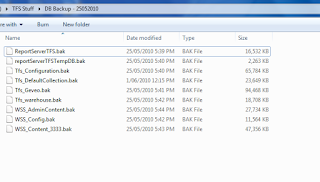
(1) Backup all TFS Databases to physical location (D:\TfsBackups)
(2) Restore all the databases to TFS2010’s instance of SQL Server
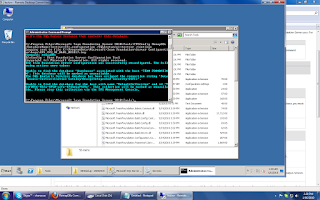
(3) Run following command in cmd as administrator
C:\Program Files\Microsoft Team Foundation Server 2010\Tools>TFSConfig RemapDBs
/DatabaseName:Testsvr;Tfs_configuration /SQLInstances:testsvr /continue
(Continue is really important, if fails first time then run it again)
(3) Install Team Foundation Server 2010
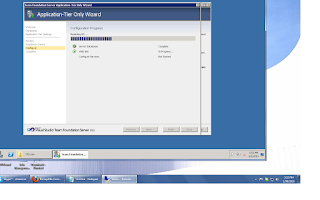
(4) After the install has completed the Team Foundation Server Configuration Wizard will open
Select Upgrade | Start Wizard
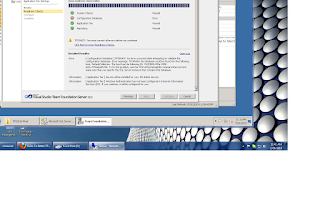
(If you run Basic/Standard/Advance option other than Upgrade, you will get following error)
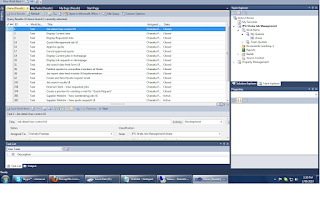
(5) Now you can go to "team foundation administration console"
You will see all your team collections
(6) Finally connects to the Team Server through Team Explorer
 :) :) :) :)

(2) Restore all the databases to TFS2010’s instance of SQL Server
(3) Run following command in cmd as administrator
C:\Program Files\Microsoft Team Foundation Server 2010\Tools>TFSConfig RemapDBs
/DatabaseName:Testsvr;Tfs_configuration /SQLInstances:testsvr /continue
(Continue is really important, if fails first time then run it again)

(3) Install Team Foundation Server 2010
(4) After the install has completed the Team Foundation Server Configuration Wizard will open
Select Upgrade | Start Wizard

(If you run Basic/Standard/Advance option other than Upgrade, you will get following error)

(5) Now you can go to "team foundation administration console"
You will see all your team collections
(6) Finally connects to the Team Server through Team Explorer
 :) :) :) :)
Friday, May 21, 2010
Upgrade from TFS 2010 RC to RTM
TFS Upgrade Summary Steps
1. Ensure you have a backup of existing SQL databases (TFS, SharePoint and Reporting)
2. Uninstall Team Foundation Server 2010 Beta2/RC components (in-place upgrade)
• Use Add/Remove programs from Control Panel to uninstall TFS Components via "Microsoft Team Foundation Server 2010"
• Select "Uninstall" to remove all TFS components from each server where Beta2/RC is installed
• NOTE: You may see a program in the Control Panel called "Microsoft Team Foundation Server 2010 Object Model". This is an object model used by products connecting to TFS (e.g. Visual Studio and Team Lab). This component will be uninstalled or updated by the installation program for those products. You should not uninstall this component during the TFS 2010 upgrade process.
3. If using a separate SharePoint farm uninstall TFS 2010 Beta2/RC extensions and install TFS 2010 RTM extensions.
4. Run the TFS 2010 setup and select the Upgrade from Previous Version Wizard and complete the wizard.
1. Ensure you have a backup of existing SQL databases (TFS, SharePoint and Reporting)
2. Uninstall Team Foundation Server 2010 Beta2/RC components (in-place upgrade)
• Use Add/Remove programs from Control Panel to uninstall TFS Components via "Microsoft Team Foundation Server 2010"
• Select "Uninstall" to remove all TFS components from each server where Beta2/RC is installed
• NOTE: You may see a program in the Control Panel called "Microsoft Team Foundation Server 2010 Object Model". This is an object model used by products connecting to TFS (e.g. Visual Studio and Team Lab). This component will be uninstalled or updated by the installation program for those products. You should not uninstall this component during the TFS 2010 upgrade process.
3. If using a separate SharePoint farm uninstall TFS 2010 Beta2/RC extensions and install TFS 2010 RTM extensions.
4. Run the TFS 2010 setup and select the Upgrade from Previous Version Wizard and complete the wizard.
Tuesday, May 4, 2010
Celebrating 2 years as a software engineer
It's the time to celebrate something in this life.
Work on irregular hours, weekends & night time took me to 2 years in this long career life.
When turn back of last 2 years
I was a guru in sharepoint.
Did well in WF,Reporting & TFS.
Touch areas like Infopath,Webservices & Remoting.
Hope to work on WCF,Silverlight in coming year.
It is always good to remind that i helped a lot to others &
make good contact with Gurus like prasanna,joy,dinesh,prabath,buddhima.
Did well in free lance projects on sharepoint & got big reputation.
So it was a hard working 2 years with great commitment.
Hope to do something different in future. :)
"It is better to be the first in the loosing team than the last in the winning team".
Work on irregular hours, weekends & night time took me to 2 years in this long career life.
When turn back of last 2 years
I was a guru in sharepoint.
Did well in WF,Reporting & TFS.
Touch areas like Infopath,Webservices & Remoting.
Hope to work on WCF,Silverlight in coming year.
It is always good to remind that i helped a lot to others &
make good contact with Gurus like prasanna,joy,dinesh,prabath,buddhima.
Did well in free lance projects on sharepoint & got big reputation.
So it was a hard working 2 years with great commitment.
Hope to do something different in future. :)
"It is better to be the first in the loosing team than the last in the winning team".
Thursday, March 25, 2010
How to delete a TFS task
Sometimes we want to delete task that we have added to TFS
But there is a no way to delete using a UI.
we have to use command promt
cd C:\Program Files (x86)\Microsoft Visual Studio 10.0\Common7\IDE or
cd C:\Program Files (x86)\Microsoft Visual Studio 9.0\Common7\IDE
then type follwing command
witadmin.exe destroywi /Collection:http:\\Optimus:8080\tfs\IPG /id:9
Collection == Team Project collection url
Id == ID that is generated by TFS
Simple as a UI click :)
Additional Details
Most of the people are not getting this witadmin.exe
So i have uploaded it. Download WITADMIN.EXE
But there is a no way to delete using a UI.
we have to use command promt
cd C:\Program Files (x86)\Microsoft Visual Studio 10.0\Common7\IDE or
cd C:\Program Files (x86)\Microsoft Visual Studio 9.0\Common7\IDE
then type follwing command
witadmin.exe destroywi /Collection:http:\\Optimus:8080\tfs\IPG /id:9
Collection == Team Project collection url
Id == ID that is generated by TFS
Simple as a UI click :)
Additional Details
Most of the people are not getting this witadmin.exe
So i have uploaded it. Download WITADMIN.EXE
Wednesday, March 24, 2010
Get query string parameters using a Java Script
function getQuerystring(key, default_) {
if (default_ == null) default_ = "";
key = key.replace(/[\[]/, "\\\[").replace(/[\]]/, "\\\]");
var regex = new RegExp("[\\?&]" + key + "=([^&#]*)");
var qs = regex.exec(window.location.href);
if (qs == null)
return default_;
else
return qs[1];
}
//Call the function
var CategoryID = getQuerystring('CategoryIDs');
if (default_ == null) default_ = "";
key = key.replace(/[\[]/, "\\\[").replace(/[\]]/, "\\\]");
var regex = new RegExp("[\\?&]" + key + "=([^&#]*)");
var qs = regex.exec(window.location.href);
if (qs == null)
return default_;
else
return qs[1];
}
//Call the function
var CategoryID = getQuerystring('CategoryIDs');
Tuesday, March 23, 2010
Change time format inside SharePoint


Subscribe to:
Posts (Atom)